JSON Validator
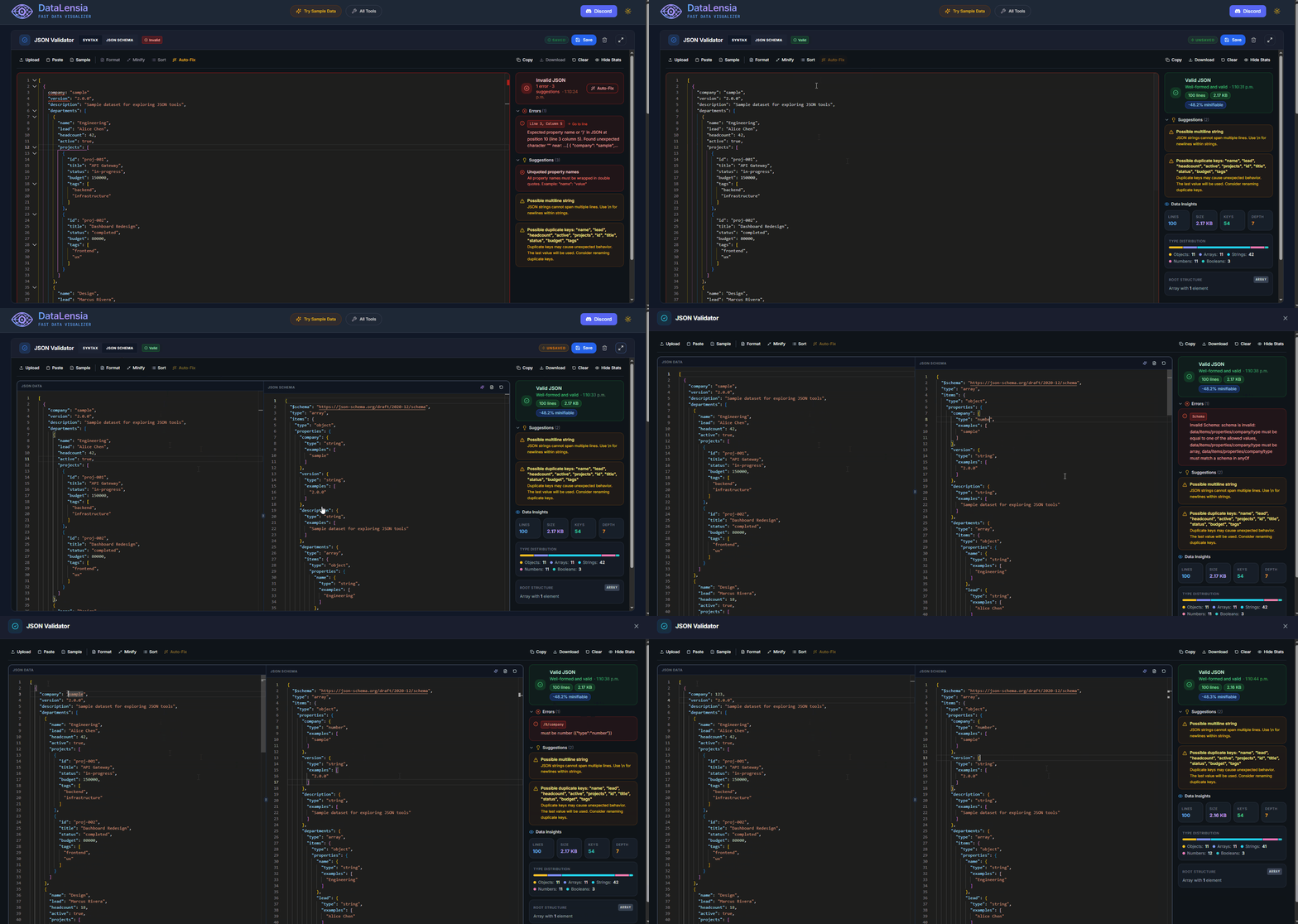
Deeply analyze, format, repair, and validate your JSON data with detailed statistics, error reports, auto-fix, and fullscreen editing.
Last updated:
The JSON Validator is more than just a syntax checker; it is a comprehensive diagnostic environment for JSON data. Whether you are debugging a complex API response, preparing configuration files, or auditing large datasets, our validator provides the tools needed to ensure structural integrity and compliance with JSON standards. It offers real-time syntax checking, an intelligent auto-repair engine, deep structural analysis, and professional formatting capabilities—all within a secure, client-side environment that guarantees 100% data privacy.
✨ Key Features
- Real-time Validation: Errors are highlighted as you type with precise line and column markers.
- Auto-Fix (Magic Repair): Automatically repair common syntax errors like missing commas, trailing commas, unquoted keys, and mismatched brackets.
- Stateless Sharing: Share your JSON data and validation results with teammates via a compressed link.
- Formatting: Pretty-print your JSON with one click to make it readable.
- Minification: Instantly minify your JSON (remove all whitespace) for compact storage or API payloads.
- Fullscreen Mode: Expand the validator to fill the entire viewport for complex files.
- Dark/Light Theme: Adapts to your system preference or manual toggle.
- Schema validation workflows: When JSON Schema mode is active, send the current input and schema to Pipelines to inspect, export, or expose schema-valid data as a mock API.
📊 Statistical Analysis
When your JSON is valid, the Validator displays a comprehensive stats panel:
| Stat | Description |
|---|---|
| Lines | Total line count of the formatted JSON |
| Size | File size in bytes/KB/MB |
| Keys | Total number of keys across all objects |
| Max Depth | Deepest level of nesting |
| Arrays | Total number of array structures |
| Objects | Total number of object structures |
| Strings | Count of string values |
| Numbers | Count of numeric values |
| Booleans | Count of boolean values |
| Nulls | Count of null values |
🏗️ Structure Information
The Validator automatically identifies and displays:
- Root type: Whether the data is an Object, Array, or primitive.
- Root keys: Lists all top-level keys for objects.
- Total elements: For arrays, shows how many items are present.
⚠️ Common Issues Detection
Beyond syntax errors, the Validator detects and suggests fixes for:
- Duplicate keys (which shadow each other in JSON).
- Very deep nesting that may cause performance issues.
- Very large string values that could indicate encoding problems.
- Mixed types within arrays (informational warning).
🛠️ How to Use
- Navigate to the Validator Tool.
- Paste your JSON into the editor, or upload a file.
- Check the Status Banner — green means valid, red means errors detected.
- If errors exist, review the Errors Panel for exact locations and messages.
- Click Auto-Fix (magic wand ✨) to attempt automatic repair.
- Use the Format button to pretty-print.
- Click the Share (🔗) button to generate a shareable link of the current state.
- Review the Statistics panel for insights about your data structure.
- With a JSON Schema configured, choose Build validation workflow to create a rerunnable pipeline for inspection, export, or a schema-gated mock API.
⌨️ Actions
| Action | Description |
|---|---|
| Format | Pretty-print with 2-space indentation |
| Minify | Remove all whitespace |
| Copy | Copy the current editor content |
| Download | Save the JSON to a local file |
| Auto-Fix | Attempt to repair common syntax errors |
| Clear | Reset the editor to empty |
🧬 The Anatomy of a JSON Error
Understanding why a JSON document is invalid is the first step to fixing it. The DataLensia Validator identifies several categories of issues:
- Syntactic Errors: These are hard failures like missing commas, mismatched brackets (e.g., closing an object with
]), or unquoted keys. These errors make the JSON unparseable by any standard library. - Contextual Warnings: Issues that are technically valid JSON but often unintended, such as duplicate keys. In most environments, the last occurrence of a duplicate key "shadows" previous ones, leading to subtle data loss bugs.
- Formatting Violations: Use of single quotes (
') instead of double quotes ("), or including comments (//or/* */). While some parsers (likeJSON5) allow these, they violate the strict RFC 8259 specification.
✨ How Magic Repair Works
Our "Auto-Fix" engine uses a multi-pass heuristic approach to repair broken JSON without destroying its structure:
- Token Analysis: We scan the raw text to identify orphaned brackets and missing quotes.
- Structural Reconstruction: The engine attempts to wrap unquoted keys and convert single-quoted strings to double-quoted ones.
- Delimiting Logic: We automatically insert missing commas between adjacent object properties or array items and remove illegal trailing commas.
- Comment Stripping: The repair engine identifies and removes both single-line and multi-line comments to bring the document into compliance with strict JSON standards.
🐘 Validating Large-Scale Datasets
Handling JSON files that are several megabytes in size requires a specialized approach to maintain browser responsiveness:
- Web Worker Offloading: All heavy validation and statistical computation are performed in background threads. This ensures that the editor remains fluid even while the engine is crunching through hundreds of thousands of lines.
- Virtual Scrolling: The editor uses virtualization to only render the lines currently visible in the viewport, allowing it to handle massive files that would otherwise crash a standard text area.
- Progressive Analysis: Statistical breakdowns are calculated incrementally, providing you with high-level insights (like size and line count) immediately while deeper metrics (like max depth and type distribution) are finalized in the background.
💡 Advanced Tip
You can use the Schema Generator to create a schema from a "good" sample of your data, and then use that schema in the Validator to ensure all future payloads match the required structure. This "Schema-First" approach is a best practice for maintaining data quality in large-scale applications.